Mid-century Cartoon 50s 扁平卡通
Meet Pip·40s·Lemo-Opuscarby Lemomo
1950s flat colour and limited animation for "follow along" films: colour printed a few pixels off its broken ink line, bodies that hold still while hands do the work, abstract colour-block rooms, a calm classroom narrator, and a cool-jazz combo.
The demo: A robot vacuum set up in three steps, told like a 1950s classroom film: place the dock, connect the app, press start.
1950s flat colour and limited animation for "follow along" films: colour printed a few pixels off its broken ink line, bodies that hold still while hands do the work, abstract colour-block rooms, a calm classroom narrator, and a cool-jazz combo. References (grammar only): UPA's early-1950s shorts (Gerald McBoing-Boing, Rooty Toot Toot): colour and line on separate cels, geometric people, colour-plane backgrounds, limited animation. 1950s classroom films (Coronet, Encyclopaedia Britannica): direct address, one sentence per picture, numbered cards. Charley Harper and Mary Blair: soft atomic-age complements, geometric figures. 1950s appliance manuals: numbered medallions, curved arrows, round call-outs, sunbursts. Copy none of their characters, drawings, lettering or music, and never name them in a film.
A scene style: it performs a real use (a set-up guide, a how-to, a recipe card, a safety card) rather than telling a story. The viewer should come away able to do the thing. See §11 for the jobs.
1. Essence, and what it is not
Flat, printed-looking colour with a thin, breathing ink line that never quite closes. Every fill is a separate "cel" printed a few px off its line, re-rolled on twos, so the picture shimmers like hand-registered paint while the camera glides. Light dry-brush tooth, paper grain, warm vignette.
People and things are geometric: egg or bean heads with the nose part of the face outline, simple garments in two or three flat colours, four-finger cartoon gloves. A presenter's body is a held drawing: only arms, hands, eyes and mouth animate. Rooms are not drawn: a scene is one colour plane, a floor band, a horizon line with gaps, and one or two props.
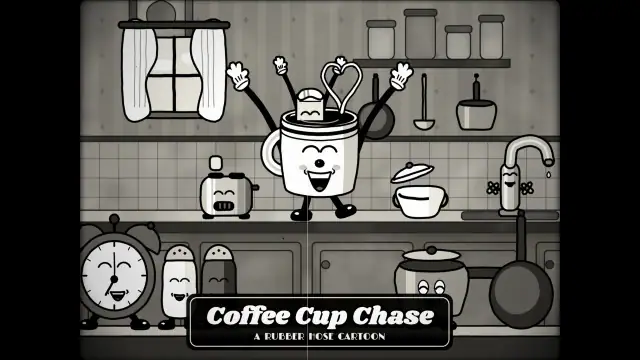
Not the 1930s rubber-hose cartoon (no black-and-white, no bouncing world, no hot jazz). Not a whiteboard explainer: it shows how to do, not why. The pictures are printed, not written on.
2. Materials & rendering
- Off-register cels: fill drawn with a small offset (a few px, down-right) from its line; the offset jitters ±1–2 px on twos. Keep it on everything, text included; switch it off only for a crisp diagram.
- Line: 3–5 px ink ribbons with ±40 % width breathing and 12–25 % breaks. Characters ~4 px, props 3–4.5 px, walls in plans thicker and broken. Hands: one outline around the union of palm and fingers, thin finger separations.
- Shading: one flat darker plane clipped inside a shape, never a gradient. Drop shadows are a copy of the shape offset down-right in a paper shade at ~50 %.
- Ornaments: 4-point atomic sparkles, 8–18-point starbursts, sunburst rays (~30 wedges, semi-transparent), boomerang and kidney shapes, polka dots.
- Grain: light; print, not film.
3. Colour logic
- A warm paper ground, a warm near-black ink, soft atomic-age complements. Nothing pure or neon.
- One ground colour per scene: a lighter tint for walls, a darker shade for floors. Never place the product on its own colour, never the presenter on their own accent.
- The product keeps one colour through the whole film; the accent (a presenter's garment, stars, bullets) is a different hue. Step grounds rotate through the rest.
- Examples: coral / mustard / turquoise on cream; tomato / olive / powder blue on oatmeal; plum / lime / sand on off-white.
4. Type & subtitles
- Roles: a 1950s script for a kicker (Oleo Script Bold); a slab serif (Alfa Slab One) for titles, numerals and headers, in ink over an offset colour plate; a geometric sans (Jost 500/600) for body, details, labels and captions.
- Caption card: a paper-coloured rounded slab with a thin ink border (its colour cel offset too), small turning stars at the ends, ~40 px sans, bottom-centre. Fades in quickly with a small rise. Hold ≥ max(1.8 s, speech + 0.6 s, chars/12 + 1 s).
- Step header: an ink disc with a paper numeral, a small letter-spaced "STEP n OF N", and the step title with a cream plate; it slides in on twos.
- Detail tags: a paper card with a star bullet, popping on the action beat next to the call-out. Data lands on the picture, never as a slide.
5. Motion quality
- On twos: poses, hand shapes and the cel jitter change at 12 fps. The camera, iris wipes, arrows, plan routes and rays move at 24 fps.
- Held body, moving hands: switch poses with a single in-between. A hand action has anticipation (pull back or lift), a fast action (0.15–0.25 s, eased out), a follow-through (recoil, settle, lift away) and lands exactly on a beat.
- Pop-ins: medallions, tags, labels and titles scale in with a back-ease (~0.25 s, strong overshoot).
- Reaching the floor: a kneel pose with 2-bone IK keeps the hands on the object while it moves; never stretch standing arms.
- Lettering: a script writes on left→right with a clip; headers slide in on twos.
6. Camera grammar
The camera is "the stand": never handheld. A vocabulary, not a route. Opening and ending come from the topic.
| Move | What it expresses | Can serve |
|---|---|---|
| Slow push (a few %) | Collecting the eye | a product on its stage; a result settling |
| Iris through a medallion | The number is the door | a change of step; a change of rule |
| Round call-out with a leader line | Context and detail at once | a hand action; a screen; a small part |
| Tilt with a pointing finger | The finger leads the frame | the one action that matters most |
| Push into a device, pan along signal rings | Person → interface → device | pairing; connecting |
| Iris from a round object into a top view | Circle to circle, function to plan | a button starting a job; a lid opening; a dial |
| Pull-back with counter-rotation from a detail to a plan | One lane becomes a pattern | a route, a schedule, a garden, a floor plan |
| Colour-block wipe (side, bottom-up) | Turning the manual's page | a tip; a summary; a new card |
| Split frame in two colour blocks | Right vs wrong, before vs after | a safety rule; an upgrade |
| Dead still ≥ 3 s | "This is the frame to screenshot" | a summary; a CTA; a QR code |
| Iris-out onto one object | The last circle | a closing on the product, the logo, the result |
Key subjects ≥ 1/3 frame height and clear of the caption band. Transitions are circles, colour-block wipes and cuts on a beat; no dissolves.
7. Sound palette
Three layers, always:
- Music: an original West-Coast cool-jazz combo: flute or muted trumpet, vibraphone (chords, arpeggios, glissandi, tremolo), pizzicato walking bass, brushes (sticks on the ride for energy), celesta, bongos or finger snaps. Not ragtime, not a spy big band, not piano and strings. Options: give every step its own vibraphone chord and bring them back one per summary item; halve or double the feel instead of changing tempo; move up a step for a payoff.
- Silence as a tool: cut everything, ambience included, for the beat before the most important action, so the first sound after it (the click, the pour) is the step. Room tone alone before a summary.
- Foley by material: cardboard creaks and thumps, appliance plastic knocks and clicks, floor scrapes, glass and ceramic clinks, pours, damped rubber stamps for medallions, paper swishes for wipes, slide whistles for dimension arrows, rising pips for "connected", pen scratches for a route, an iris "shhk".
- Ambience: warm room tone (low-passed brown noise, very quiet), a mantel-clock tick on the grid; a device's motor hum can take over when it works.
- Mix: J/L cuts (lines start before their iris, tails ring on); narration compressed on top, music ducks ~8 dB, foley unducked, −14 LUFS.
- Voice: calm classroom authority, one clause per line ("Step one. Set it against a wall."). Whisper-check every line; accents can blur key nouns.
8. Native moves
Each move serves information. A menu: use the ones your film needs.
- Off-register colour makes an info card hand-made and warm. Fits content like: museum rules; a bank app screen; hotel check-in.
- Limited animation points the eye: the still body leaves the hand as the only mover, and the hand is the step (one hand action per step, on a beat). Fits content like: threading a sewing machine; changing a bike tyre; setting a thermostat.
- The round call-out is the close-up; the step's data lands inside or on it on the action beat. Fits content like: a dosage on a measuring cup; a torque value on a bolt; a PIN on a keypad.
- The numbered medallion marks hierarchy and opens the next step; it stamps onto the outgoing subject and the camera goes through it. Fits content like: a pool's five rules; a checklist for a flight; stages of a recycling sort.
- The payoff turns function into ornament: a real process (a route, a watering schedule, a seating plan) draws itself region by region and, seen whole, reads as an atomic-age textile. Fits content like: a sprinkler's coverage; a delivery round; a week of medication.
9. Pitfalls of the medium
- A route that ignores obstacles → follow the product's real rules; flow streamlines bend around obstacles and never cross. Lay it one region per beat, not all at once.
- A separate nose wedge looks glued on → one open spline from the bridge round the skull, closed at the nose tip.
- Thin arms read as sticks from the neck → shoulders at the torso corners, sleeves as a thick ink ribbon with a colour ribbon on top.
- Fat-blob fingers turn the hand into a cloud → stroke every part first, fill second (one union outline), slender fingers with separation lines.
- Zooming the world triples the ink → close-ups in call-out circles drawn at native scale.
- Detail text without reading time → move the data into the detail, the context into the title and the voice; chars/12 + 1 s.
- A transition drawing the next scene before its start → clamp local time to just past the start.
10. Engine
demo/engine/toon.js (the style: setClock, shape for any shape in the style, ink ribbons, plane, two-plate text, fit, the manual arrow, ornaments, the global register REG), demo/engine/chars.js (presenter, glove hands, the demo product), demo/engine/icons.js (18 icons). demo/film.js has liftable helpers: callout(), medallionAt(), tag(), stepHeader(), the flow-route generator laneY() + buildPath(), and the transition block (medallion iris, button iris, colour-block wipe, iris-out). API table and a minimal example: DEMO.md.
11. Variation space
You decide the thing, the presenter (or none), which steps and in what order, the opening, the ending, the camera path, the colours, the pacing and the music. Use cases are grammar for the order and duration of information; build your own timeline from the user's facts.
| Use case | Information order | Hold per layer | Length |
|---|---|---|---|
| Product set-up guide | product name → title → step title → step detail on the action beat → payoff → tip → CTA | title ≥ 4 s; step title the whole step; detail ≥ chars/12 + 1 s; summary ≥ 3 s clean | 30–40 s, 2–5 steps |
| Safety / rules card | rule number → rule → one "why"; a held figure, a medallion, a gesture, a pictogram per rule | 3–4 s per rule | 20–40 s, 3–6 rules |
| Recipe or ritual card | step → quantity/time → result; side view, call-out on the hands, result as a top-view pattern | 3–5 s per step | 30–45 s |
| Onboarding for an app or service | screen action → setting value → confirmation stamp; the screen lives in the call-out | 3–4 s per action | 20–30 s |
| Store or event notice | headline → time/place → CTA; colour-block wipes between cards | ≥ 3 s per card | 15–25 s |
All far from our demo:
- Structures: a rules card with no product, one held figure and a medallion per rule; a recipe on a tabletop, seen from the side, ending in a top view; a do / don't split, each rule shown twice in two colour blocks.
- Openings: the finished result first, then "here's how"; the problem in one gesture (a hand fumbling a cable); a numbered list stamped on, then opened item by item.
- Endings: a checklist ticking itself; the hands at rest beside the finished thing; a QR code held dead still in a starburst.
Swapping demo/content.json and rebuilding is a technical check that the engine re-flows, not a way to make a film.
How our demo was made (story, shots, score, end card, build, content fields): DEMO.md. Read it after your treatment exists.
Director's notes for the demo film
One example among many. Don't reuse its story, arc, shots, props or timings.
Demo: Meet Pip (40.0 s) · midcentury-toon.mp4 · source in demo/
Story & structure
A product set-up guide for a fictional robot vacuum, Pip (the first use case in STYLE.md §11). It fits a product page, a QR code on the box, or a help centre. The old guide framed every film in this style as "a 30–40 second scene film: the user gives you the thing and its steps; you decide the shots, the timing, the sound and the score"; that framing now lives in STYLE.md.
Structure: hook reveal ("Meet Pip.", the box opens on a mustard ground) → one scene per step (wide + round detail call-out): ① set the dock against a wall (50 cm clear each side), ② pair the phone (2.4 GHz), ③ hold the start button (one second) → payoff (the vacuum's route drawn over the floor plan) → tip → poster lockup (the three steps as medallions) → iris-out end card.
The presenter, June, a new homeowner: an egg head with a long pointed nose that is part of the face's outline, a bob with a mustard headband, a coral turtleneck and navy cigarette trousers (the treatment explains why she is not a 1950s "housewife"). Her body is a held drawing; hands are four-finger gloves in four shapes: open, flat, point and grip. Scenes: one colour plane, a floor band, a horizon with gaps, and props such as a wall edge, a socket, a phone.
The demo's reference for how the moves served information:
How the native moves serve information (not story):
- Off-register colour makes a flat info card feel hand-made, and warm enough to sit on a product page. Keep it on everything, text included.
- Limited animation points the eye. When the body is still, the hand is the only thing moving, and that hand is the step. Give every step one hand action with anticipation → action → follow-through, landing on a beat.
- The round call-out (a manual's magnifier) is the close-up. The wide stays for context and the hands get big inside the circle. The step's data (50 cm, 2.4 GHz, one second) lands inside or on that circle on the action beat, never as a slide.
- The numbered medallion is both a hierarchy marker and a door. It stamps onto the outgoing scene's subject, and the camera goes through it into the next step.
- The payoff turns function into ornament. In the demo, the vacuum's real route (wall-follow, then boustrophedon lanes that flow around furniture, with a small curl at every turn, stars and dots between lanes) draws itself room by room, one room per beat. Stepping back, it reads as an atomic-age textile.
Shots
The camera is always "the stand": pushes, trucks, tilts, pull-backs, never handheld. The demo used one transition grammar, the circle:
| Move | Where in the demo | Why |
|---|---|---|
| Slow push 1.00 → 1.07 | Hook | Collects the eye onto the product on its stage |
| Iris through the medallion (circle grows from the stamp to full frame, 0.9 beat) | Every step change | The step number is the door |
| Truck right + gentle push | Step 1 wide | Follows the push toward the wall |
| Round detail call-out (frame in frame, with a dashed leader line to its subject) | Every step | Constant line weight at close-up scale; context stays visible |
| Push into the phone, then pan along the signal rings | Step 2 | From person → interface → device |
| Tilt down with the finger | Step 3 | The press is the most important action; the finger leads the frame |
| Button → iris → top view | Step 3 → payoff | The start button opens into the plan; circle to circle |
| Pull-back + counter-rotation, 5.4× → 1.0×, −6° → 0° (signature) | Payoff | Scale reveal: one lane → a whole flat printed like a textile |
| Colour-block wipe (side for the tip, bottom-up for the lockup) | Tip, lockup | Changes the "page" of the manual |
| Dead still ≥ 3 s | Lockup | Tells the viewer: this frame is the one to screenshot |
| Iris-out onto the product, end card inside a circle | End | The classic cartoon ending, and the last circle |
Why this route, for this job: every step change went through its own number, so the hierarchy was also the edit; the button → top view iris joined the most important action to its result; the pull-back gave the one "wow" of the film to the product's real behaviour; the dead-still lockup is the screenshot. Each is one choice from STYLE.md §6, not the style's default opening or ending.
Timeline (built from content): hook 4 bars, each step ≥ 3 bars (from its voice length), the last step 2 bars, then payoff 3, tip 2, lockup 3 and end 2 bars at 132 BPM. Three steps = 22 bars = 40.0 s. Key subjects ≥ 1/3 frame height and out of the bottom 140 px (the caption card).
Score structure
- Music: an original West-Coast cool-jazz combo at 132 BPM: vibraphone (chords, arpeggios, glissandi, motor tremolo), flute (melody), pizzicato upright bass (walking), brushes (a swirl plus 2 and 4, sticks on the ride for the payoff), a celesta colour. Every step lands on its own vibraphone chord (F6, B♭maj7, C9), and the lockup brings those chords back one per medallion, transposed. In the payoff the vibraphone plays "one note per lap", driven by lap times exported in
events.json. - Rhythm arc: normal → double-time at the payoff (key up a whole step) → half-time for the tip (the breath) → normal for the lockup.
- Silences: A (0–1.36 s): no music, only the box. B (the last beat before the press): everything off, ambience included, so the first sound after it is the start click. C (before the lockup): room tone only. The first sound after silence C is the first medallion stamp.
- J/L cuts: music enters before the reveal; each step's line starts half a beat before its iris; the motor starts 0.2 s before the payoff; the last Wi-Fi pip rings into step 3; the payoff's glissando tail rings into the tip.
- Ambience: warm room tone (low-passed brown noise, about −42 dB) and a very quiet mantel-clock tick on the half-note grid. In the payoff, Pip's motor hum (a band-passed saw with a slow LFO plus brush hiss) takes over.
- Foley in this film: the box (creak, flap thumps a semitone apart, a swish into a slap), the plug click, floor scrapes for the dock, stamps for every medallion, slide whistles for the 50 cm arrows, rising pips for "connected", pen scratches as each room's route draws, the ink line peeling off paper, an iris "shhk".
- Mix: narration compressed on top, music ducks 8 dB under it, foley unducked, −14 LUFS, true peak −1.2.
tools/cuecheck.pyfound 0 hits off the half-beat grid. - Narrator: calm classroom authority. The demo uses Kokoro
am_michaelat 0.94.bm_georgewas tried: whisper heard "dock" as "dark" in his British vowel. Keep lines to one clause: "Step one. Set the dock against a wall."
Palette & props
Palette (demo; every value is a content.json field):
| Role | Hex |
|---|---|
| Paper | #F4EAD5 (shade #E6D8BC, #D4C29F) |
| Ink (warm black) | #2B2420 |
| Coral (accent, June's sweater) | #E4613F / dark #B8452B |
| Mustard (hook ground, belts, dots) | #E8B43A / light #F3D37F |
| Turquoise (the product) | #3FA7A0 / dark #257A74 |
| Dusty blue / avocado / pink / plum (step grounds) | #7F9CC0 · #A7AE5B · #F0B4A8 · #6E4A6B |
| Navy (trousers) · hair · skin | #3B4766 · #3A2621 · #F2C7A0 |
| Kraft (box) | #C9955D / #A2713F / #DDB47F |
- One ground colour per scene, lighter tint for walls (
tint(col, .45)), darker shade for floors (shade(col, .16)). Never place the product on its own colour or June on coral/pink. - Line: 3–5 px ink ribbons with ±40 % width breathing and 12–25 % breaks. Characters: 4 px. Props: 3–4.5 px. Walls in plans: 6–7 px, broken. Hands: one 6 px outline around the union of palm and fingers, 2.4 px finger separations.
- Shading: one flat darker plane clipped inside a shape (never a gradient). Drop shadows are a copy of the shape offset (12, 12) in a paper shade at 50 %.
- Ornaments: 4-point atomic sparkles, 8–18-point starbursts, sunburst rays (30 wedges, 55 % alpha), boomerang and kidney shapes, polka dots.
- Type: Oleo Script Bold for the kicker ("Meet Pip."); Alfa Slab One for titles, numerals and step headers (ink with a cream or colour plate offset 4–7 px); Jost 500/600 for body, details, labels and captions (letter-spaced caps for small labels).
- Grain: light (mux grain 4) plus the paper overlay; the look is print, not film.
Demo numbers behind the STYLE.md rules: register offset (6, 4) px re-rolled at 12 fps ±1.6 px; walls in plans 6–7 px broken; hands one 6 px outline and 2.4 px finger separations; drop shadow offset (12, 12); sunburst 30 wedges at 55 % alpha; mux grain 4; walls tint(col, .45), floors shade(col, .16); pop-ins 0.24–0.3 s with overshoot 1.9; hand anticipation 20–60 px, recoil 6–10 px; kneel drops the hips 150 units (kneel: true, kneelPose()); caption card Jost 500 42 px, 60 px above the bottom, fade 0.16 s with a 10 px rise, colour cel offset 5 px, coral 8-point stars; step title Alfa Slab 64 px; detail tags Jost 36 px.
The payoff: the vacuum's real route (wall-follow, then boustrophedon lanes that flow around furniture, with a small curl at every turn, stars and dots between lanes) draws itself room by room, one room per beat, while the camera pulls back 5.4× → 1.0× with a −6° → 0° counter-rotation. Stepping back, it reads as an atomic-age textile.
End card
After the lockup, inside the iris circle: film title, style name, Lemo-Opuscar, LemoLab × Claude Opus 5.5, asset credits. The LemoLab sign-off belongs to this library's demo only; a user's film carries no LemoLab credit and no copy of this card.
Build notes
demo/content.jsonholds every word, number, colour, the voice and the payoff plan.python3 demo/tools/lines.pyturns it intolines.json.- Kokoro (
core/tts/tts.py) →voices/+dur.json;asr_check.pyuntil every line is OK (step numbers are compared as digits). - The timeline is built from content (see Shots).
- The score (
music/score.py, forked to a sub-agent with the cue map) →score.wav, stems andhits.json. core/render/events.mjsexports the same event times the pictures use.tools/cuecheck.pychecks every hit against the half-beat grid and the score.mix.pybuilds foley, voice, ducking and the three silences.tools/cues.mjs→.srt; render withcore/render/video.mjs(960 frames ≈ 30 s with 2 workers, throughcore/render/slot.mjs);mux.sh … 24 4.sh demo/build.shdoes all of it;sh demo/build.sh stillsrenders the content-swap test.
Pitfalls tied to this demo's props:
demo/content.jsonholds every word, number, colour, the voice and the payoff plan.python3 demo/tools/lines.pyturns it intolines.json.- Kokoro (
core/tts/tts.py) →voices/+dur.json;asr_check.pyuntil every line is OK (step numbers are compared as digits). - The timeline is built from content: hook 4 bars, each step ≥ 3 bars (from its voice length), the last step 2 bars, then payoff 3, tip 2, lockup 3 and end 2 bars at 132 BPM. Three steps = 22 bars = 40.0 s.
- The score (
music/score.py, forked to a sub-agent with the cue map) →score.wav, stems andhits.json. core/render/events.mjsexports the same event times the pictures use.tools/cuecheck.pychecks every hit against the half-beat grid and the score (0 off in the demo).mix.pybuilds foley, voice, ducking and the three silences.tools/cues.mjs→.srt; render withcore/render/video.mjs(960 frames ≈ 30 s with 2 workers);mux.sh … 24 4.sh demo/build.shdoes all of it;sh demo/build.sh stillsrenders the content-swap test.
content.json fields
Everything readable and every colour comes from demo/content.json. The page reads ?content=<file> for tests.
| Field | Type | Range | If out of range |
|---|---|---|---|
product |
string | 1–12 chars | Squeezed to fit on the box label (maxW) |
kind |
string | free | Only for your own reference |
title / subtitle |
string | ≤ 36 / ≤ 24 chars | Title wraps to 2 lines in the hook, shrinks to 50 px on the lockup |
hook.kicker / hook.line |
string | ≤ 14 chars / one sentence | Kicker squeezed to 760 px; the line becomes the first caption |
steps[] |
array | 2–5 | Each step adds ≥ 3 bars (5.45 s); the lockup row respaces (R 104 → 88 px beyond 3 steps). 4 steps ≈ 45 s: trim the tip or end card if you need ≤ 40 s |
steps[].title |
string | ≤ 22 chars | Shrinks to 40 px (header), wraps to 2 lines (lockup) |
steps[].detail |
string | ≤ 30 chars | Wraps to 2 lines; must be readable in its window (chars/12 + 1 s) |
steps[].icon |
enum | the 18 icon names | Unknown → spark |
steps[].action |
enum | place (push to a wall + clearance diagram; uses measure), tap (phone pairing, signal rings to the product), press (finger + hold ring); anything else → show (icon in hand, finger taps it in the call-out) |
— |
steps[].measure |
string | e.g. "50 cm" | Only for place; empty = arrows without labels |
steps[].line |
string | one short sentence | Voice + caption; a long line lengthens its step |
payoff.caption |
string | ≤ 40 chars | Shrinks to 26 px |
payoff.plan |
object | y0,y1, dock[x,y], zones[] (name, x0, x1, color, checks), rug, items[] (shape: sofa, kidney, boomerang, chair, plant, table, bed; x, y, s, rot, color, accent) in 1920×1080 plan px |
Zones narrower than 400 px get the wall-follow loop only; items become flow obstacles automatically |
tip.label/text/icon/line |
strings | text ≤ 40 chars | Header shrinks; the ribbon widens |
outro.line / outro.cta |
string | cta ≤ 48 chars | CTA shrinks to 20 px |
palette |
object | paper, ink, product, productDark, accent, hook, steps[], tip |
Missing keys fall back to the demo palette |
voice |
object | Kokoro id, speed |
— |
film |
object | name, style, credits |
End card |
Steps to swap (technical check): edit content.json → sh demo/build.sh (it rebuilds lines, voice + whisper check, events, mix, captions, video). The score is written for 22 bars; if your step count changes the length, rerun the music sub-agent with the new section table, or keep 3 steps.
Minimal example (only what changes):
{
  "product": "Mo", "title": "Your New Robot Mower", "subtitle": "Set Up in 4 Steps",
  "hook": { "kicker": "Meet Mo.", "line": "Meet Mo, your new robot mower." },
  "steps": [
    { "title": "Set the base station", "detail": "Level ground, 1 m clear in front", "icon": "dock", "action": "place", "measure": "1 m", "line": "Step one. Set the base station on level ground." },
    { "title": "Peg the boundary wire", "detail": "30 cm in from the lawn edge", "icon": "cable", "action": "show", "line": "Step two. Peg the wire around the lawn." }
  ],
  "palette": { "product": "#E4613F", "accent": "#3FA7A0", "hook": "#7F9CC0" }
}
demo/content_alt.json is the full version of that example (a 4-step robot mower on a garden plan); its stills are in demo/stills/alt_*.jpg.
Swapping this file and running build.sh checks that the engine re-flows; it is not how a user's film is made.
Engine reference
demo/engine/toon.js (the style), demo/engine/chars.js (the presenter, hands and product), demo/engine/icons.js (18 icons). All functions draw in the current canvas transform.
| Function | What it draws | Key params |
|---|---|---|
setClock(t) |
Sets the clock for the on-twos register jitter; call once per frame | t seconds |
shape(ctx, pts, o) |
Any shape in this style: off-register fill + tooth + broken ink line | fill, line (px), off [dx,dy] (default: jittered REG), grain 0–1, breaks 0–1, shade [{pts,color,alpha}], seed |
ink(ctx, pts, w, o) |
Pressure ink ribbon along a polyline | closed, breaks, wob, taper, color, upto 0–1 (draw-on) |
plane(ctx, pts, fill) |
Lineless ground plane | off, grain |
text(ctx, str, x, y, o) |
Two-plate lettering | font, fill, plate (off-register colour plate), off, align, rot, maxW, track |
fit(ctx, str, fam, px, maxW, maxLines, minPx) |
Wraps, then shrinks to fit | returns {font, px, lines} |
arrow(ctx, from, to, o) |
The moving manual arrow | u draw-on, bob beat phase, bend, head, fill, dashedShaft |
star / sparkle / rays / atom / kidney / boomerang |
Mid-century ornaments | radius, points, rotation, fill |
REG |
Global register: {dx:6, dy:4, jit:1.6, on:true} |
set REG.on = false for crisp diagrams |
drawOwner(ctx, pose, t) |
The presenter | x,y,s,dir,view('front'/'q'/'side'/'back'),face('neutral'/'happy'/'wow'/'focus'/'wink'),armF/armB{a1,a2},handF/handB,kneel,blink,look,prop{kind:'phone'/'dock'/'cable'} |
drawHand(ctx, x, y, angle, kind, side, scale) |
Four-finger glove: 'open', 'flat', 'point', 'grip' |
— |
drawPip(ctx, x, y, o) |
Round robot product | view('side'/'top'), s, light, press, brush, ang, colors{product,productD,trim,light} |
icon(ctx, name, cx, cy, size, o) |
Icon library: dock, phone, start, cable, wifi, plug, water, beans, cup, filter, box, clock, check, leaf, key, bulb, spark, gear | main, light, dark |
Film-level helpers in film.js you can lift: callout() (round detail view with a leader line), medallionAt() (numbered stamp), tag() (detail card), stepHeader(), the potential-flow laneY() + buildPath() route generator, and the transition block in renderFilm() (medallion iris, button iris, colour-block wipe, iris-out).
Minimal example: a warm-orange four-point spark with a cursor-tail, in this style (the "only colour" slot: keep fill fixed while the scene recolours):
import { setClock, shape, ink, sparkle, starPts, spline, PAL } from './engine/toon.js';
setClock(t);                                   // register jitter on twos
ctx.fillStyle = PAL.paper; ctx.fillRect(0, 0, 1920, 1080);
// the tail: a broken ink stroke that draws on
ink(ctx, spline([[520, 700], [700, 640], [860, 560]], false, 10), 6, { upto: Math.min(1, t / 0.6), breaks: 0.2 });
// the spark: any closed path -> off-register fill + breathing ink line
const pts = [];
for (let i = 0; i < 8; i++) { const a = i * Math.PI / 4 - Math.PI / 2, r = i % 2 ? 26 : 110; pts.push([960 + Math.cos(a) * r, 520 + Math.sin(a) * r]); }
shape(ctx, pts, { fill: '#D97757', line: 4.5, grain: 0.3, breaks: 0.15 });
sparkle(ctx, 1040, 440, 28, { fill: PAL.white });